
How to Connect TWaveStrategy to Telegram
Want TWaveStrategy to send real-time alerts to your Telegram? Follow this quick guide to link it up using a bot and group chat.
Step 1: Create a Telegram Group
- Open Telegram and click on New Group.
- Add at least one contact (you can remove them later).
- Name your group something like Robo Tee Log.
Step 2: Add the Bot to the Group
- Search for your bot by its username, for example:
robot_tee_bot
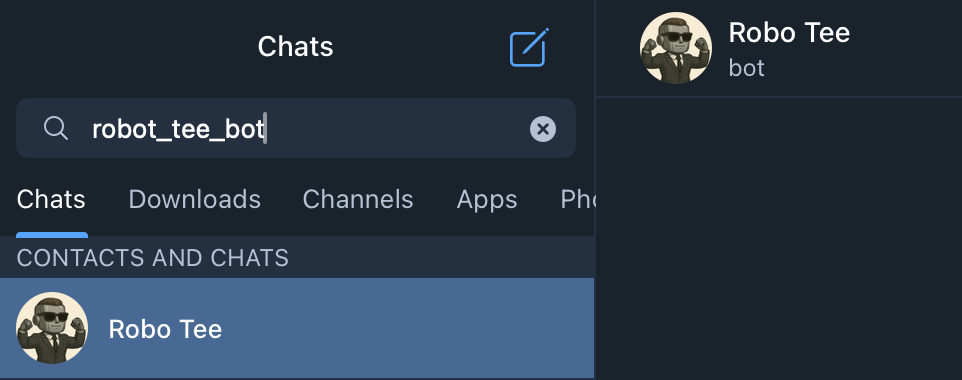
- Tap the group name → Add Member → Search for
robot_tee_botand add it.
The bot only needs to be a member, not an admin.
Step 3: Get the Chat Room ID
- Go to Telegram Web.
- Check the URL bar. It will look like this:
https://web.telegram.org/k/#-4647795882
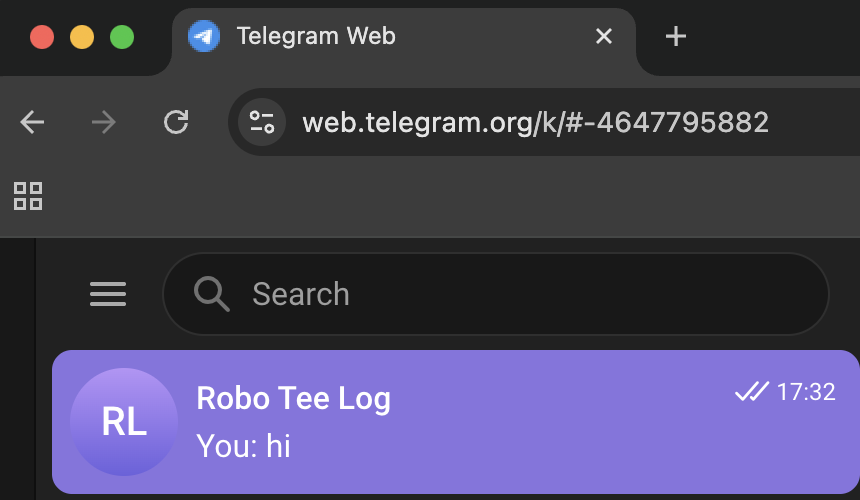
- Copy the number after the
#-, without the minus sign:
-4647795882 → 4647795882
📌 Copy only the number. Do not include the minus (
-).
Step 4: Paste Chat ID into TWaveStrategy
- Open your NinjaTrader and go to TWaveStrategy settings.
- Look for
TelegramChatIdor similar. - Paste the ID you copied (e.g.,
4647795882). - Save and run the strategy.
Done!
Your TWaveStrategy is now linked to Telegram. You’ll get alerts for entries, exits, and signals — all in real-time.